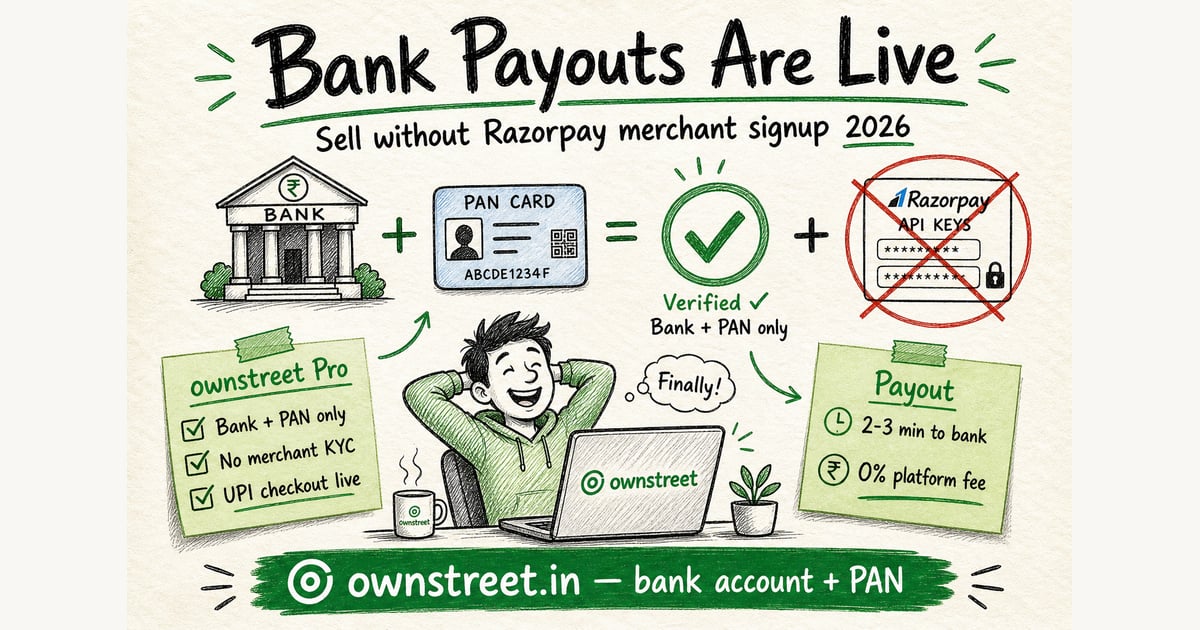
You hit the wall every creator knows: build the PDF, then stall for days on Razorpay merchant signup, API keys, and KYC uploads before one rupee can hit your bank. ownstreet **bank payouts** fix that. On Free, add bank account + PAN in Dashboard → Payments, publish 1 live product, and accept UPI. No Razorpay merchant account. No key_id or key_secret. Pro unlocks unlimited products plus email capture and reviews. Marketplace listing is free after first sale.
ℹ️ Quick answer
sign up free, open Dashboard → Payments → Bank payouts, enter bank account + IFSC + PAN, publish 1 live product. Buyers pay with GPay or PhonePe. Payouts usually land in 2–3 minutes on UPI after Razorpay confirms the transfer. Upgrade to Pro when you need product #2.
What are ownstreet bank payouts?
Bank payouts are the fast path for creators who want UPI checkout without running their own Razorpay merchant dashboard. ownstreet handles checkout on platform Razorpay. After a buyer pays, Razorpay Route sends your share to the bank account you linked.
- **Feature:** linked bank account + PAN inside ownstreet (no API keys).
- **Advantage:** skip Razorpay merchant signup, document uploads, and test/live key juggling.
- **Benefit:** go from product draft to live UPI sales in one dashboard session.
Free plan: bank payouts with 1 live paid product. You can also use your own Razorpay keys (BYOK) instead. Pro adds unlimited products, email capture, and reviews. Marketplace listing is free after first sale. Compare plans on pricing.
Bank payouts vs connecting your own Razorpay keys
| Step | Old path (BYOK) | New path (bank payouts) |
|---|---|---|
| Razorpay merchant signup | Required | Not required |
| API keys in dashboard | key_id + key_secret | None |
| Seller KYC with Razorpay | Full merchant KYC | Bank account + PAN only |
| ownstreet plan | Free or Pro | Free (1 product) or Pro (unlimited) |
| Buyer UPI checkout | Yes | Yes |
| Money reaches your bank | Via your Razorpay | Via Razorpay Route to linked bank |
| ownstreet platform fee | 0% | 0% |
💡 Tip
Already on live Razorpay keys? ownstreet still uses your BYOK checkout first when live keys are connected. Bank payouts are for creators who want the simpler bank + PAN path instead.
BYOK setup guide (Free plan path): Razorpay setup for digital creators. Pro worth it math: Is ownstreet Pro worth it.
What do you need to turn on bank payouts?
- ownstreet Free or Pro account (bank payouts work on Free with 1 live product).
- Bank account number, IFSC, and beneficiary name.
- PAN (required for individual and proprietorship business types).
- GSTIN optional if you are GST registered.
- Name, email, and phone (pre-filled from your profile).
You do not create a Razorpay merchant login. You do not paste API keys. Open Dashboard → Payments → Bank payouts, submit the form, and wait for linked account activation (often quick, sometimes pending on first submit).
How fast do payouts reach your bank?
Be precise on timing so buyers and sellers know what to expect.
- Buyer pays on your ownstreet page (UPI, cards, wallets). Payment captures in seconds.
- Razorpay Route transfers your share to your linked bank account. Usually **2–3 minutes on UPI**, sometimes longer on weekends or first sales.
- Buyer download unlocks when Razorpay confirms the payout transfer, not the instant they tap pay.
- Your bank app may show the credit shortly after Razorpay marks the transfer done.
You keep 100% of the sale minus Razorpay gateway fee. ownstreet still charges 0% platform fee on product sales. UPI rail overview: NPCI UPI. Razorpay Route product: Razorpay Route docs.
Who should use bank payouts vs BYOK?
| Creator situation | Best path |
|---|---|
| First product, hates payment setup | Free + bank payouts |
| Already live on Razorpay merchant | Keep BYOK keys connected |
| Wants backup if Route pauses | Bank payouts + BYOK keys (recommended) |
| Free plan, one hero product | Bank payouts (1 live product) |
| Needs marketplace listing | Free after first sale + bank payouts or BYOK |
Marketplace still needs live checkout before listing. Guide: Creator marketplace India. First sale playbook: First digital product sale India.
5-step launch with bank payouts
- 1. Sign up free and create your product draft.
- 2. Dashboard → Payments → Bank payouts: bank account + PAN.
- 3. Publish 1 live product on Free, test a ₹1 UPI purchase on mobile data.
- 4. Put your store link in Instagram bio and post one CTA for seven days.
- 5. Upgrade to Pro at pricing when product #2 is ready.
FAQ: Sell Digital Products without Razorpay Merchant Account
Can Free users use bank payouts?
Yes. Free users connect bank payouts with bank account + PAN and publish 1 live paid product. Upgrade to Pro for unlimited products, email capture, and reviews. Marketplace listing is free after first sale.
Is there really zero Razorpay setup?
Zero Razorpay **merchant** setup on your side: no signup, no API keys, no merchant dashboard KYC loop. You add bank account + PAN in ownstreet. Razorpay Route handles settlement rails in the background.
Do buyers still pay with UPI?
Yes. GPay, PhonePe, Paytm, cards, and net banking work on your product page. Buyers see INR pricing before checkout.
What fees apply?
ownstreet charges 0% platform fee on product sales. Razorpay gateway fees still apply on each transaction. Pro is ₹299/month flat.
What if I already connected Razorpay keys?
Live Razorpay keys take priority for checkout. Bank payouts are the simpler alternative when you have not finished merchant KYC or prefer not to manage keys. You can run both: keys as backup, bank payouts as primary.
Where do I start?
Sign up free: signup. Bank payouts form: Dashboard → Payments. Ebook walkthrough: Sell ebooks bank account + PAN.
Checkout and delivery checklist
Optimize for Indian buyers: INR on the product card, UPI on mobile, and automatic delivery after a verified pay. Fancy design rarely beats a working checkout for bank payouts digital products.
- Write the offer in one sentence before redesigning covers.
- Run one real UPI test purchase on mobile data.
- Pin one product URL in bio; remove clutter.
- Track completed pays for seven days before switching tools.
- Plans: Pricing. Start: Signup.
A one-week execution rhythm
Day 1: publish or fix the product page. Day 2: real UPI test buy. Day 3–5: one CTA daily where buyers already are. Day 6: turn DMs into FAQ lines. Day 7: keep or tweak price once.
- Do not juggle five offers while you are still testing.
- Save objections and refund reasons in a notes doc.
- Prefer verified checkout over personal UPI screenshots.
- UPI context: NPCI UPI overview.
- Gateway fees: Razorpay pricing.
Mistakes that waste the first week
Most failures are process failures: unclear offer, card-only checkout for India phones, silent delivery, or invented fee comparisons. Fix the rails before you chase another platform.
- Titles no human would say out loud.
- Launching ten SKUs before one checkout works.
- Training buyers to pay on personal QR just once.
- Skipping mobile-data testing.
- Related: Sell digital products India.
💡 Tip
ownstreet takes 0% platform fee on product sales. Free allows one live product; Pro is ₹299/mo when you need more. See Pricing.
Trust notes that cut support drama
Trust compounds when delivery is instant and support replies with an order id. Keep a paper trail: purchase email, settlement export, and a one-line refund policy visible before pay.
- State what happens if the download link fails.
- Do not promise outcomes you cannot deliver.
- Help: /help.
- Launch: How to start selling digital products India.
Fair competitor research rules for bank payouts digital creators
Open the other product’s live pricing and help pages this week. If a number is not on that page, do not put it in your blog or pitch.
- Screenshot the fee row with the date.
- Compare jobs: UPI, INR, delivery, marketplace.
- Migrate one bestseller first.
- ownstreet: 0% platform fee on sales.
- Compare plans: Pricing.
Mobile checkout reality check for bank payouts digital creators
Most Indian buyers decide on a phone with GPay or PhonePe already open. If your page fights that habit, they leave.
- Test on mobile data.
- Show ₹ on the product card.
- Unlock the file only after verified pay.
- Keep support email visible after checkout.
- Start: Signup.
Share this post
Further reading

Lakshath
Founder, ownstreet · ownstreet
Updated Sept 2026