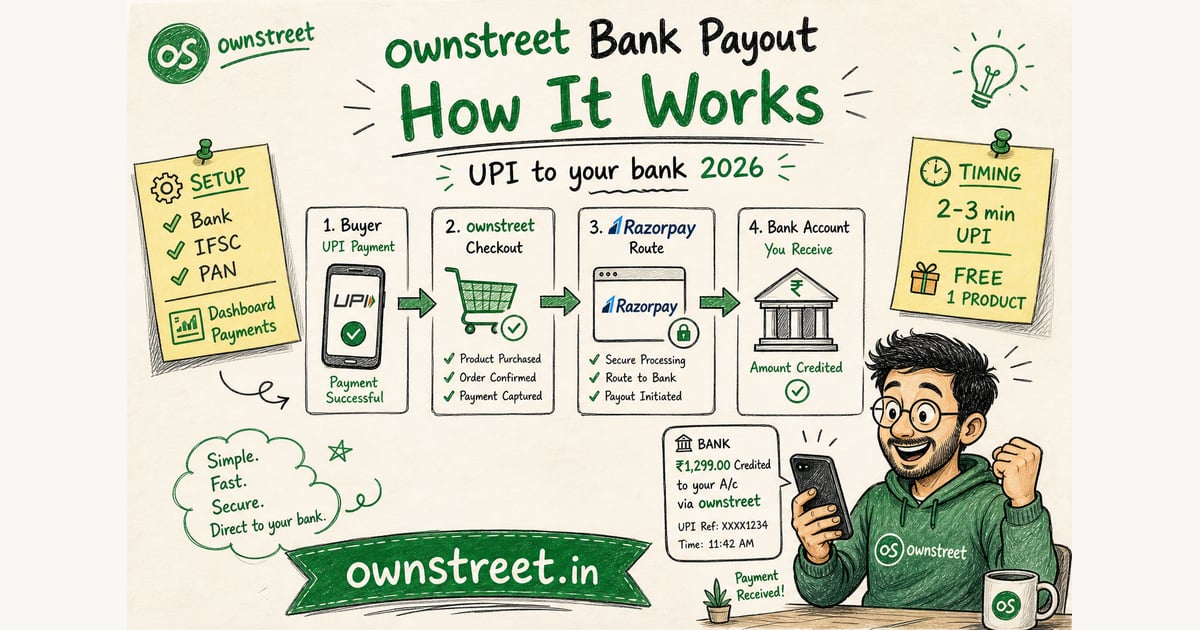
You want the full money path: buyer pays with UPI, file unlocks, rupees hit your bank. No Razorpay merchant dashboard. No API keys pasted in settings. This guide walks the exact flow from Dashboard → Payments → Bank payouts through Razorpay Route settlement, including activation status, timing, and what Free vs Pro changes.
ℹ️ Quick answer
you submit bank account + IFSC + PAN. ownstreet creates a linked account on Razorpay Route. Buyer pays UPI on your product page. After payment clears, Route transfers your share to your bank. Usually 2–3 minutes on UPI. Free: 1 live paid product.
The 5-step bank payout flow (end to end)
- **1. You onboard:** Dashboard → Payments → Bank payouts. Enter bank account, IFSC, PAN, legal name.
- **2. Activation:** ownstreet submits a Razorpay Route linked account. Status shows pending or active.
- **3. Buyer checkout:** Customer opens your product page, taps Pay, completes UPI on mobile.
- **4. Payment capture:** ownstreet records the order. Route initiates transfer to your linked bank account.
- **5. Delivery + payout:** Buyer gets the download link. Your bank receives the payout after Razorpay confirms.
Launch overview: Sell digital products without Razorpay. Ebook walkthrough: Sell ebooks bank account + PAN.
What you enter in the bank payouts form
| Field | What to use | Why it matters |
|---|---|---|
| Bank account number | Your savings/current account | Route sends payouts here |
| IFSC | 11-character branch code | Routes to correct bank branch |
| PAN | Your personal or business PAN | KYC for linked account |
| Account holder name | Matches bank records | Reduces activation failures |
| Email / phone | Account contact | Razorpay verification if needed |
⚠️ Note
Name mismatch between PAN and bank account is the top activation delay. Use the exact legal name your bank shows on statements.
What happens when a buyer pays with UPI
The buyer never sees your bank details. They pay on your ownstreet checkout page through platform Razorpay. UPI apps (GPay, PhonePe, Paytm) appear at payment. After Razorpay captures the payment, Route splits the order: gateway fees to Razorpay, your share to the linked account you submitted.
- **Feature:** checkout runs on ownstreet Razorpay, not your merchant account.
- **Advantage:** you skip merchant signup and API key management.
- **Benefit:** first sale possible the same day you publish, if activation is active.
UPI rail: NPCI UPI overview. Route docs: Razorpay Route.
How long until money hits your bank?
| What | Typical time | Notes |
|---|---|---|
| Buyer download unlock | Usually under a minute on UPI | Separate from your bank credit |
| Bank credit (India domestic) | About 2 working days | Razorpay settlement schedule: after 2 days |
| Weekends / bank holidays | Can add a day | Settlement skips non-banking days |
| First-ever payout | May take longer | Activation must be active first |
Paid in Orders does not mean the rupees are in your bank app yet. Razorpay settles India domestic Route payouts after about 2 working days on typical cycles. Test with a ₹1 product on mobile data before you announce publicly.
Bank payouts vs BYOK Razorpay keys
| Bank payouts | BYOK (your Razorpay keys) | |
|---|---|---|
| Merchant signup | Not required | Required (KYC + dashboard) |
| API keys in ownstreet | Not required | key_id + key_secret |
| Settlement account | Bank you linked in form | Your Razorpay settlement |
| Free plan | 1 live product | 1 live product |
| Checkout priority | Used when no live BYOK keys | Live keys take priority |
Already finished Razorpay KYC? You can connect BYOK instead or as backup. BYOK guide: Razorpay setup for digital creators.
Activation status: pending vs active
- **Pending:** linked account submitted, waiting on Razorpay verification. Do not announce sales yet.
- **Active:** payouts enabled. Publish your product and run a test purchase.
- **Failed / needs fix:** usually name mismatch, invalid IFSC, or PAN format. Re-submit corrected details.
- **Paused:** rare compliance hold. Contact support with your dashboard email.
Check status in Dashboard → Payments → Bank payouts. Most activations complete quickly on first submit with matching legal names.
Free vs Pro on bank payouts
| Plan | Bank payouts | Product limit | Also unlocks |
|---|---|---|---|
| Free | Yes | 1 live paid product | UPI checkout, bio link store |
| Pro | Yes | Unlimited products | Email capture, reviews, more links (marketplace free after first sale) |
Pro math: Is ownstreet Pro worth it. Plans: pricing.
Troubleshooting common bank payout issues
- **Stuck on pending:** wait 24 hours, then re-check name/PAN match with bank records.
- **Buyer paid but no download:** refresh order page; payout may still be confirming on Route.
- **Test purchase failed:** confirm activation is active and product is published live.
- **Want second product:** upgrade to Pro or replace your one Free live product.
- **Prefer direct Razorpay settlement:** connect BYOK keys; they override bank payouts at checkout.
FAQ: ownstreet Bank Payout How It Works
Do I need a Razorpay merchant login?
No. ownstreet runs checkout on platform Razorpay. You only submit bank + PAN for Route linked account.
Can Free users use bank payouts?
Yes. Connect bank payouts, publish 1 live paid product, accept UPI.
Is there an ownstreet platform fee?
0% ownstreet platform fee on product sales. Razorpay gateway fees still apply. That shortfall vs list price is not TDS: TDS on digital product sales India.
Where does the buyer's money go first?
Through ownstreet checkout on Razorpay. Route then transfers your share to the bank account you linked.
What if I already have Razorpay API keys?
Connect them in Dashboard → Payments. Live BYOK keys take checkout priority. Bank payouts remain available as backup.
Checkout and delivery checklist
Optimize for Indian buyers: INR on the product card, UPI on mobile, and automatic delivery after a verified pay. Fancy design rarely beats a working checkout for this topic.
- Write the offer in one sentence before redesigning covers.
- Run one real UPI test purchase on mobile data.
- Pin one product URL in bio; remove clutter.
- Track completed pays for seven days before switching tools.
- Plans: Pricing. Start: Signup.
A one-week execution rhythm
Day 1: publish or fix the product page. Day 2: real UPI test buy. Day 3–5: one CTA daily where buyers already are. Day 6: turn DMs into FAQ lines. Day 7: keep or tweak price once.
- Do not juggle five offers while you are still testing.
- Save objections and refund reasons in a notes doc.
- Prefer verified checkout over personal UPI screenshots.
- UPI context: NPCI UPI overview.
- Gateway fees: Razorpay pricing.
Mistakes that waste the first week
Most failures are process failures: unclear offer, card-only checkout for India phones, silent delivery, or invented fee comparisons. Fix the rails before you chase another platform.
- Titles no human would say out loud.
- Launching ten SKUs before one checkout works.
- Training buyers to pay on personal QR just once.
- Skipping mobile-data testing.
- Related: Sell digital products India.
💡 Tip
ownstreet takes 0% platform fee on product sales. Free allows one live product; Pro is ₹299/mo when you need more. See Pricing.
Trust notes that cut support drama
Trust compounds when delivery is instant and support replies with an order id. Keep a paper trail: purchase email, settlement export, and a one-line refund policy visible before pay.
- State what happens if the download link fails.
- Do not promise outcomes you cannot deliver.
- Help: /help.
- Launch: How to start selling digital products India.
Ops notes your future self needs for ownstreet bank payout creators
A clean order export beats twenty WhatsApp forwards when a buyer, bank, or CA asks what happened.
- Save purchase emails.
- Export settlements monthly.
- Write a one-line refund rule before pay.
- Never soft-ack unpaid downloads.
- Help: /help.
Audience fit over tool hopping for ownstreet bank payout creators
Switching platforms will not fix an unclear offer. Prove one SKU with UPI, then decide if the tool is the bottleneck.
- Write who it is for in two lines.
- Price in INR.
- Promote for seven days with one CTA.
- Only then compare other checkouts.
- Gateway fees: Razorpay pricing.
Delivery paths that reduce DMs for ownstreet bank payout creators
Automatic delivery after UPI beats "I will send the file tonight." Buyers forgive plain design; they do not forgive silence.
- Success screen + email both carry access.
- Test with a second account.
- Document install steps for templates.
- Keep the master file private.
- Browse: /marketplace.
Share this post
Further reading

Lakshath
Founder, ownstreet · ownstreet
Updated Sept 2026