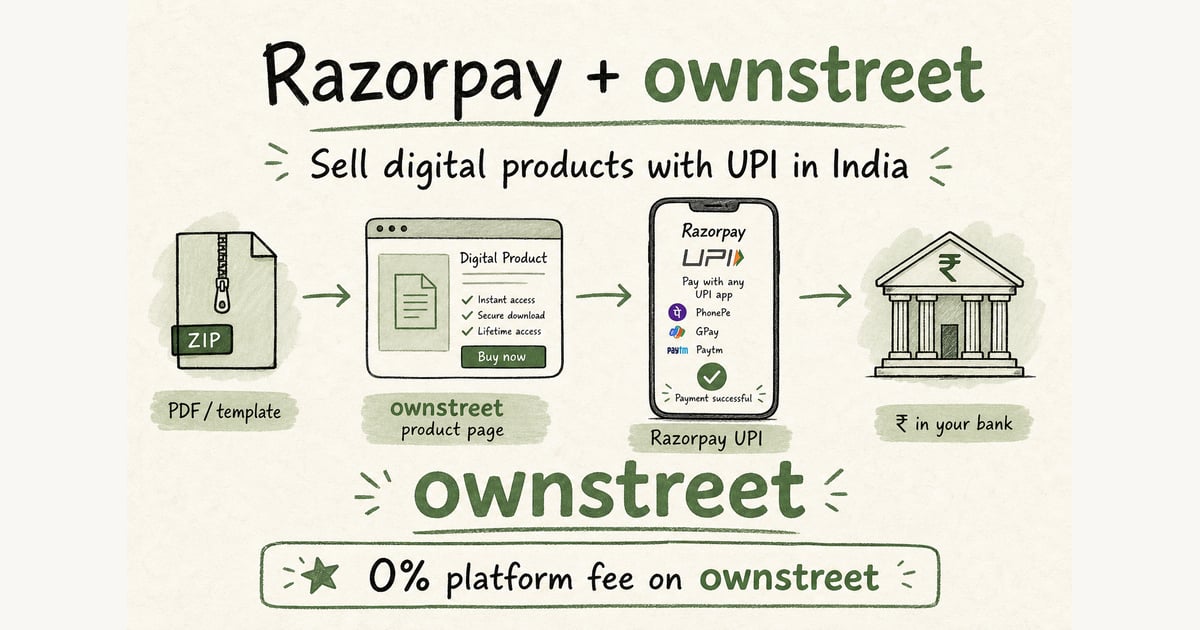
If you want paid users, payment friction is the first bottleneck to kill. A clean offer with broken checkout still earns zero. This razorpay setup digital products india guide covers the bring-your-own-keys (BYOK) path: your Razorpay account, your keys, your dashboard. New here? Start with our plain Razorpay setup for digital creators (no website needed). Skipping Razorpay merchant signup? Bank Payouts for Digital Products India. This page goes deeper on webhooks, delivery, and launch conversion for BYOK sellers.
ℹ️ Quick answer
This guide is for the BYOK path: you already have (or want) your own Razorpay merchant account and connect key_id + key_secret in ownstreet. Want to skip merchant signup? Use bank payouts on Free instead (bank account + PAN only). See Bank Payouts for Digital Products India.
Why Razorpay setup quality impacts paid conversions
- Indian buyers expect UPI. Card-only flows drop completion.
- Failed or slow post-payment delivery destroys trust.
- Incorrect webhook handling creates paid-but-not-delivered support chaos.
- Poor checkout copy causes hesitation right before payment.
If your page gets clicks but no payments, pair this guide with Link in Bio Not Converting India and First Digital Product Sale India.
Step 1: Account, KYC, and payment methods
Create a Razorpay account, complete KYC, and ensure UPI methods are enabled before launch. Official references: Razorpay Docs and NPCI.
| Checklist item | Target state | Why it matters |
|---|---|---|
| KYC | Approved | Avoid payout holds and failed activations |
| UPI | Enabled | Higher completion for Indian mobile users |
| Checkout branding | Clear name/logo | Trust at payment moment |
| Settlement visibility | Dashboard monitored | Cashflow confidence |
Step 2: Connect checkout to your product page
Put payment after clear value, not before. Product title, outcome, INR price, proof, then pay button. Keep one primary offer above the fold. For store structure, use Digital Product Store India.
💡 Tip
Use simple copy near checkout: Pay via UPI/cards. Instant download after payment. This removes buyer uncertainty at the last step.
Step 3: Delivery flow and webhook essentials
On successful payment event, trigger delivery immediately (download link, email, or access page). Keep a fallback support line for rare failures. Razorpay webhook docs: Webhooks.
- Verify webhook signature before processing.
- Make delivery idempotent to avoid duplicate sends.
- Log payment_id, email, product_id for support/debugging.
- Send success confirmation message with next steps.
Step 4: 24-hour pre-launch test routine
- Complete one real UPI payment from a second device/account.
- Confirm delivery arrives under 60 seconds.
- Test failure case: interrupted payment should not deliver.
- Validate mobile data speed, not only office Wi-Fi.
Step 5: Launch sequence for paid users
Publish one offer, one CTA, one link for 7 days. Do not rotate products daily. Track checkout started vs completed and fix one bottleneck at a time. Promotion rhythm: Instagram Monetization India.
India UPI BYOK connect checklist
- Razorpay KYC approved and UPI methods enabled in the Razorpay dashboard.
- Copy key_id and key_secret into ownstreet Dashboard → Payments (live keys for live sales).
- Publish one INR product with clear outcome and price above the pay button.
- Run a real UPI payment on mobile data from a second device.
- Confirm download unlocks and the receipt email arrives under a minute.
- Keep a support email on the product page for paid-but-not-delivered tickets.
What to avoid during Razorpay setup
- Going live with card-only methods when your audience is India-mobile.
- Using test keys on a public bio link.
- Delivering files before payment is captured (or soft-acking unpaid orders).
- Ignoring webhook failures until buyers complain in DMs.
- Building a custom site for one PDF when ownstreet + BYOK already covers checkout.
- Skipping bank payouts as an option if merchant KYC is still stuck. See Bank Payouts for Digital Products India.
⚠️ Note
Confirm Razorpay fee rows on razorpay.com/pricing for your methods. Do not invent a flat %. ownstreet still takes 0% platform fee on product sales. Free = 1 live product. Pro ₹299/mo. Pro Max ₹799/mo. Pricing.
Bank payouts vs BYOK (pick one primary path)
| Path | You need | Best when |
|---|---|---|
| Bank payouts | Bank account + PAN | No merchant signup yet, 1 live product on Free |
| BYOK Razorpay | KYC + API keys | You want Razorpay settlement reports and your own MID |
Gateway docs: Razorpay payments. UPI rails: NPCI. No-website creator path: Razorpay setup for digital creators.
Post-payment support checklist
- Buyer sees download on success screen and in email.
- You can find payment_id (pay_…) in logs or Razorpay dashboard.
- Interrupted payments never unlock the file.
- Support reply template ready for "paid, no file" within business hours.
- One offer stays live for seven days before you swap CTAs.
ownstreet takes 0% platform fee on product sales. Free = 1 live product. Pro ₹299/mo when you need unlimited products and email capture. Pro Max ₹799/mo for coupons and storefront extras. Pricing.
FAQ: Razorpay Setup for Digital Products in India
Can I sell digital products in India with Razorpay only?
Yes, but you still need a conversion-ready page and reliable delivery logic. Payment alone does not convert if offer and trust blocks are weak.
Do I need UPI for better conversion?
For Indian audiences, usually yes. UPI is default behavior and often improves checkout completion versus card-only flows.
How do I reduce failed payment support tickets?
Use webhook verification, clean logs, and clear buyer messaging on success/failure states. Always show a support contact after payment attempts.
When should I use bank payouts instead of BYOK Razorpay?
Choose bank payouts if you want to sell this week without Razorpay KYC, API keys, or merchant dashboard setup. Add bank account + PAN on Free, publish one product, test UPI. Move to BYOK when you need your own Razorpay settlement reports or already run payments elsewhere. Walkthrough: How Bank Payouts Work.
Should I upgrade to Pro before first sale?
Usually no. Validate with one live product first, then upgrade when you need multiple products, email capture, and stronger branding. Plan details on Pricing.
BYOK keys vs bank payouts: choose before docs
Many creators stall in Razorpay dashboards when they only needed bank account + PAN on Free. Pick the path that matches your week-one goal, then ignore the other docs until you need them.
💡 Tip
If KYC is pending, do not DM personal QR codes. Keep selling on bank payouts or wait for approval. Soft-acking unpaid orders breaks trust and refunds.
- First UPI sale without merchant KYC: ownstreet bank payouts.
- Own settlement reports: bring your own Razorpay keys after KYC.
- Always run one real ₹ test purchase on mobile data.
- Bank payouts: How Bank Payouts Work.
- Gateway fees: Razorpay pricing.
Smoke test checklist before you promote
A setup is not done until a real phone on mobile data completes UPI and the file unlocks. Do this before Stories, ads, or WhatsApp blasts.
- Pay with a second UPI id if you can.
- Confirm success screen and email both carry the file.
- Confirm unpaid attempts do not unlock downloads.
- Save the order id for support practice.
- Then pin the product link and promote for seven days.
Smoke test before you spend a rupee on ads
Setup is incomplete until mobile data + UPI + file unlock works on a second phone. Fix that before Stories, WhatsApp blasts, or ads.
- Pay with a second UPI id if you can.
- Confirm success screen and email both carry the file.
- Confirm unpaid attempts do not unlock downloads.
- Bank payouts alternative: How Bank Payouts Work.
- Fees: Razorpay pricing.
Bottom line
A strong razorpay setup digital products india flow turns traffic into paid users faster than any content hack. Get checkout right, verify delivery, and run one focused offer. Launch now at Signup, then refine with data from week one.
Share this post
Further reading

ownstreet team
Creator Payments · ownstreet
Updated Sept 2026