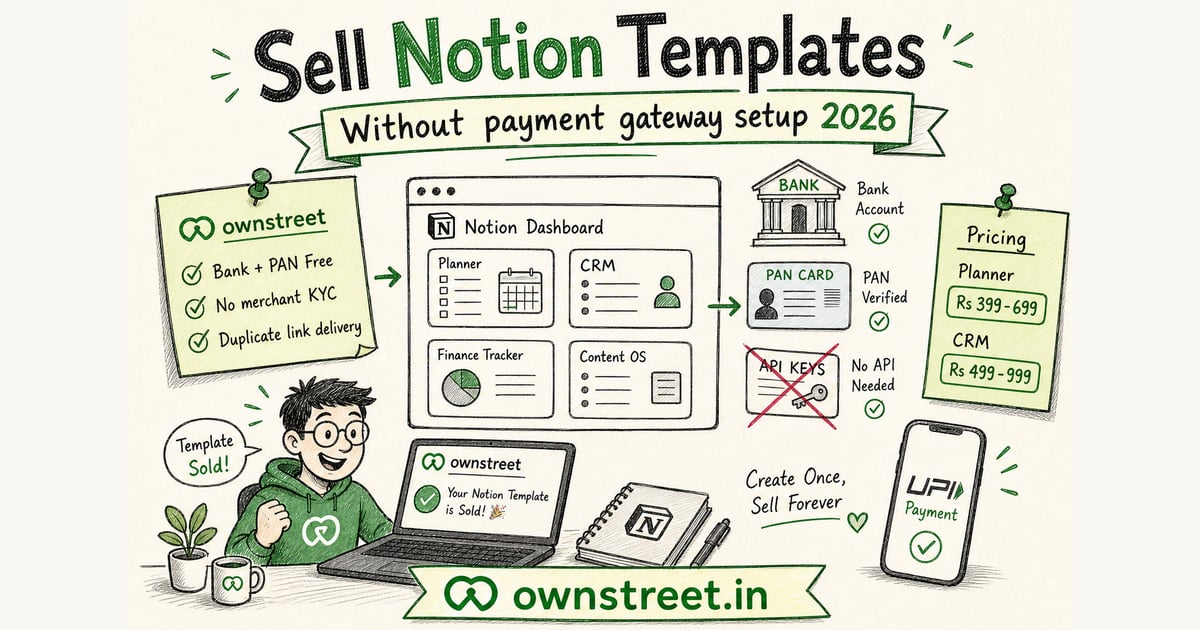
You already built the planner or CRM. The blocker is payments: Razorpay merchant signup, API keys, and KYC forms that ask for a website. You do not need your own payment gateway account to sell one Notion template. ownstreet bank payouts let Free users add bank account + PAN, publish 1 live product, and accept UPI. Buyers get the duplicate link after payment.
ℹ️ Quick answer
sign up free, upload your Notion template product, set ₹399–₹999, open Dashboard → Payments → Bank payouts, enter bank account + IFSC + PAN, publish. Share the store link. Buyers pay with GPay or PhonePe and receive the duplicate link instantly.
What does without payment gateway setup mean?
It means you do not open a Razorpay or Cashfree merchant dashboard, paste key_id and key_secret, or wait on full merchant KYC before your first sale. ownstreet runs checkout. You only add bank details and PAN so payouts reach your account.
- **Feature:** bank payouts on Free (bank account + PAN).
- **Advantage:** no merchant signup, no API keys, no website field on a gateway form.
- **Benefit:** your first Notion template can go live the same day you finish the dashboard.
Full bank payouts guide: Sell digital products without Razorpay. Classic Notion pricing guide: Sell Notion templates India.
Bank payouts vs connecting your own payment gateway
| Step | DIY payment gateway | ownstreet bank payouts |
|---|---|---|
| Merchant signup | Required | Not required |
| API keys | key_id + key_secret | None |
| What you enter | Full KYC docs | Bank + PAN |
| Free plan limit | 1 live product (if on ownstreet) | 1 live product |
| Buyer UPI | After KYC approval | Yes after bank account is active |
| ownstreet platform fee | 0% | 0% |
💡 Tip
Already have live Razorpay keys? You can still use BYOK. Bank payouts are the simpler path when you have not finished merchant setup.
Notion templates that sell in India
- Content calendars for creators: ₹399–₹699.
- Freelancer CRM + invoice trackers: ₹499–₹999.
- Student planners and exam trackers: ₹199–₹499.
- Habit and fitness trackers: ₹299–₹599.
- Agency SOP hubs: ₹999–₹2,499 (better on Pro with unlimited products).
Buyers pay for a system that works on day one, not for Notion itself. Show screenshots of the dashboard on the product page. Buyer-side browse: Buy Notion templates India.
How to deliver a Notion template after UPI payment
- Create a shareable Notion duplicate link (or PDF with the link + setup steps).
- Add that file or link as the product delivery on ownstreet.
- Buyer pays with UPI on your store page.
- Download or link unlocks after payment clears.
- Buyer taps Duplicate to their workspace in under two minutes.
On bank payouts, download unlocks when Razorpay confirms the transfer to your bank (usually 2–3 minutes on UPI). UPI overview: NPCI. Route docs: Razorpay Route.
24-hour launch without a payment gateway account
- Hour 0–2: Finalize one template and export screenshots.
- Hour 2–4: Create product on ownstreet, set INR price, write a one-line outcome.
- Hour 4–6: Connect bank payouts (bank + PAN), wait for active status.
- Hour 6–8: Test a ₹1 purchase on mobile data.
- Day 2–7: Bio link live, same CTA daily, no second template until 3 sales.
Plans: pricing. Bank form: Dashboard → Payments. Pro when you need template #2: Is ownstreet Pro worth it.
Free vs Pro for Notion sellers
| Need | Free | Pro ₹299/mo | Pro Max ₹799/mo |
|---|---|---|---|
| Bank payouts (bank + PAN) | Yes | Yes | Yes |
| Live paid templates | 1 | Unlimited | Unlimited |
| Email capture on bio page | No | Yes | Yes |
| Marketplace listing after first sale | Yes | Yes | Yes (Featured is Pro Max) |
| ownstreet platform fee | 0% | 0% | 0% |
India UPI steps (no merchant gateway account)
- Finalize one Notion duplicate link and 3 dashboard screenshots.
- Create the product on ownstreet. Set ₹399–₹999 and paste delivery link or PDF.
- Open Dashboard → Payments → Bank payouts. Enter bank account, IFSC, and PAN.
- Wait until bank payouts show active, then buy your own template with UPI on mobile data.
- Confirm Duplicate works in a fresh Notion workspace.
- Share ownstreet.in/username in bio. Do not ask for personal UPI in DMs.
What to avoid when selling Notion without a gateway signup
- Leaving the template as "request edit access" instead of a duplicate link.
- Shipping five templates on Free (only 1 live paid product is allowed).
- Skipping the ₹1 / full-price self-test and discovering delivery is broken after a Reel.
- Promising lifetime updates you never ship.
- Using a personal QR after someone already opened your store page.
- Copying someone else's public Notion and reselling it. Use original work only.
⚠️ Note
Bank payouts skip your merchant signup. They do not skip tax or KYC rules that apply to you as a seller. Keep PAN accurate. For GST questions see Is selling digital products legal without GST India (not legal advice).
Notion product page checklist
- Three screenshots of the real dashboard, not only a mock cover.
- Duplicate link tested in a second Notion account.
- Setup steps for first-time Notion users (two sentences is enough).
- ₹ price and what is included (databases, templates, examples).
- Support email for "link expired" edge cases.
When template #2 is ready, upgrade to Pro ₹299/mo. Pro Max ₹799/mo adds coupons and storefront extras. Marketplace listing can happen after first sale on Free too. Pricing.
Duplicate-link hygiene
Never hand out a workspace where buyers can edit your master. Use Duplicate / share-as-template patterns Notion documents for sellers. Re-test the link after every major template update so paying buyers are not stuck on an old version.
FAQ: Sell Notion Templates without Payment Gateway in India
Do I need Razorpay to sell Notion templates?
No merchant account required. Use bank payouts with bank account + PAN on Free. Optional: connect your own Razorpay keys if you already have them.
Can Free users sell more than one template?
Free allows 1 live paid product. Draft others, upgrade to Pro for unlimited live templates.
How do buyers get the Notion link?
After UPI payment, they receive the download or delivery link with your duplicate URL and setup steps.
Is there a platform fee?
ownstreet charges 0% platform fee on sales. Razorpay gateway fees still apply.
Where do I start?
Signup, then bank payouts. Marketplace browse for buyers: /marketplace/category/notion.
Bank payouts path for Notion sellers
You can sell a Notion template with UPI without opening your own Razorpay merchant account. On ownstreet Free, bank account + PAN unlocks bank payouts while buyers still pay UPI. Still run a real test purchase.
- Duplicate your template; never sell edit access to the master.
- Write clear Make a duplicate instructions.
- Price in ₹; pin the product URL in bio.
- Walkthrough: How Bank Payouts Work.
- Connect Razorpay keys later when you want your own settlement dashboard.
Buyer trust checks for no-gateway Notion sales
Buyers care that the duplicate link works and that UPI unlocks it automatically. Skipping Razorpay merchant KYC is fine; skipping a test purchase is not.
- Test the share link on a second Google account before you promote.
- Write three bullet install steps in the product description.
- Never grant edit access to your master workspace.
- Bank payouts path: How Bank Payouts Work.
- Connect Razorpay keys later when you want MID-level settlement reports.
When to add Razorpay keys later
Stay on bank payouts until a real reason appears: you want MID settlement PDFs, you already run Razorpay elsewhere, or your CA asks for gateway-native reports. Do not open KYC mid-launch just because a tutorial said so.
- First sale proof beats a perfect MID.
- Keys path guide: Razorpay setup for digital products India.
- Plans stay Free until a second live SKU needs Pro: Pricing.
Share this post
Further reading

Lakshath
Founder, ownstreet · ownstreet
Updated Sept 2026