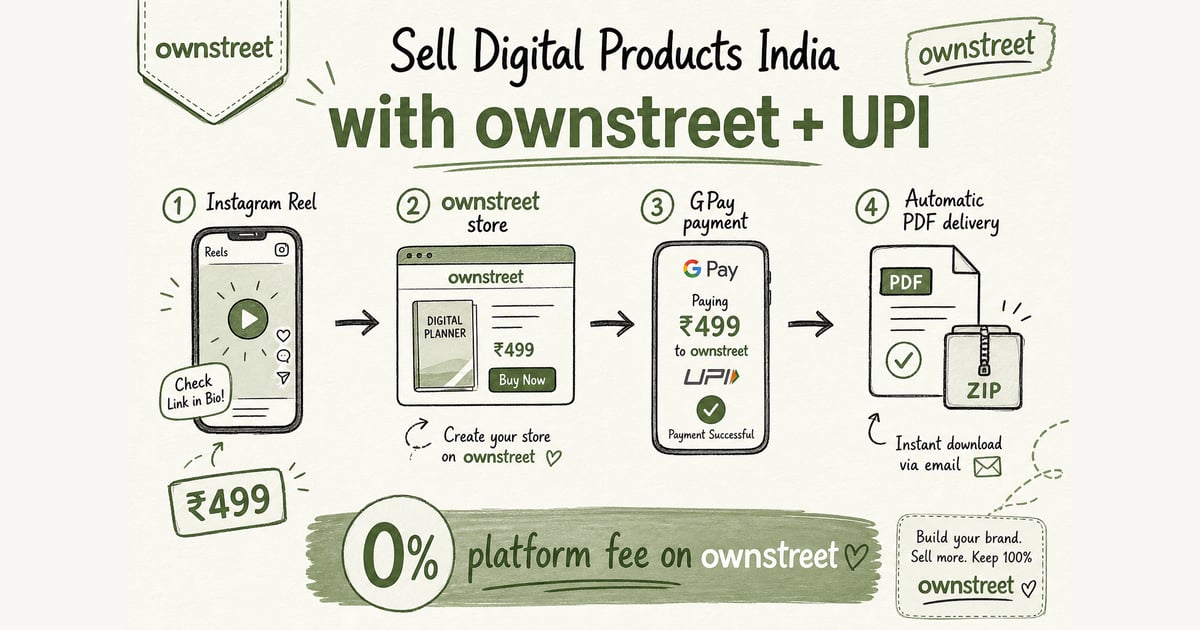
Selling digital products in India is one of the highest-margin creator businesses in 2026. The problem is execution: many creators choose tools with USD billing, weak Indian payment support, and confusing setup. Not sure which channel to use first? Read Where to Sell Digital Products India. Shopping instead? Buyer guide: Buy digital products India. This guide gives you a practical India-first playbook.
ℹ️ Quick answer
If your audience is mostly in India, optimize for UPI checkout, INR pricing, and simple delivery. Those three decisions usually matter more than your product page design.
What counts as a digital product?
- Ebooks, guides, and checklists
- Notion templates, Canva templates, and swipe files
- Lightroom presets, LUTs, and design assets
- Mini-courses, workshops, and recorded lessons
- Spreadsheets, calculators, and paid resource packs
If your file can be delivered instantly and repeatedly with near-zero marginal cost, it is a digital product business.
Step 1: Pick one narrow offer before you build a store
Do not launch with 10 products. Launch one offer for one buyer type. Example: "Instagram Reel Hook Swipe File for Coaches" converts better than "Social media bundle" because it is specific.
- Bad: generic template pack for everyone
- Better: product tied to one job-to-be-done
- Best: product framed by outcome + time saved
Step 2: Set up payments for India-first conversion
UPI is non-negotiable for Indian buyers. If checkout demands only international cards, your conversion rate usually drops. On ownstreet you can start with bank payouts (bank account + PAN on Free, no Razorpay merchant signup) or connect your own Razorpay keys. Either path supports UPI-first checkout with 0% ownstreet platform fee on sales. Compare paths in Bank Payouts for Digital Products India. Payment methods reference: Razorpay Docs.
- Enable UPI, cards, and net banking
- Price in INR to reduce decision friction
- Keep checkout steps minimal (name + email + payment)
- Send delivery instantly after payment success
Step 3: Price for India (₹99 vs ₹999 rule of thumb)
A simple pricing ladder helps you learn fast: entry product (₹99-₹299), core product (₹499-₹1,499), and premium bundle (₹1,999+). Start from one core offer; add entry and bundle only after the core converts.
| Product type | Typical range | When to use |
|---|---|---|
| Starter toolkit | ₹99 - ₹299 | Lead generation + first purchase |
| Core template/product | ₹499 - ₹1,499 | Main revenue driver |
| Bundle / cohort / premium | ₹1,999+ | Higher LTV from warm buyers |
Step 4: Understand tax basics early (without overcomplicating)
Tax rules depend on your structure and turnover, so use a CA for final advice. For official basics, refer to GST portal guidance. The practical rule: keep clean invoices, transaction logs, and payout records from day one.
- Track every sale with date, buyer email, amount, and product
- Store payout reports and fee breakdowns monthly
- Use consistent naming for SKUs and invoices
- Avoid mixing personal and business payments
Step 5: Build a conversion-ready page (not just a pretty page)
Your page should answer five buyer questions fast: What is this? Who is it for? What outcome do I get? Why trust you? How do I buy right now?
- Strong headline with outcome
- Short product preview (3-5 bullets or screenshots)
- Simple pricing + clear refund terms
- Single CTA above the fold
- Proof: testimonials, samples, or usage results
Internal resources to speed up your setup
- Compare platform costs in this breakdown: Best Linktree Alternatives for Indian Creators
- See plans and feature limits: Pricing
- Pick a page style quickly: Templates
- Build your launch list first: Waitlist
External references worth bookmarking
- Payment flow docs: Razorpay Payments Docs
- Policy updates and compliance: Reserve Bank of India
- Tax basics and filings: GST Portal
- Market context snapshots: Statista India Creator Economy
Common mistakes that kill digital product sales
- Using only one payment option
- Writing vague product descriptions
- Launching without an email capture flow
- Trying to sell multiple unrelated products at once
- Ignoring post-purchase onboarding and support
💡 Tip
Fast growth loop: publish one practical free resource, collect emails, launch one paid product, and improve the page weekly using click + conversion data.
FAQ: Sell Digital Products in India
What is the easiest digital product to sell first in India?
Start with templates, presets, or a checklist you can deliver instantly. If you can hand over the file or link within minutes after UPI payment, it is a strong first product.
Do I need UPI to sell digital products in India?
UPI is the default for many Indian buyers. If your checkout relies only on international cards, conversion usually drops. Make sure UPI is available and show the full INR price before payment.
How should I price my first digital product in rupees?
Use a simple ladder: entry ₹99–₹299, core ₹499–₹1,499, and premium ₹1,999+. For your first sale, pick one core offer and test the price for at least two weeks before changing.
Where do I deliver the product after payment?
Deliver immediately on payment success: send a download link or email with access instructions. If you sell memberships, deliver via a member area or access link tied to the buyer.
What GST basics should I know as a creator?
GST depends on turnover, sales channel, and how you are structured. Dedicated hub: GST for digital products India. Confirm with a chartered accountant. Keep payout records from day one. Reference: GST Portal.
Can I sell with UPI without my own Razorpay account?
Yes. ownstreet bank payouts on Free need bank account + PAN. Buyers still pay with UPI. Step-by-step: How Bank Payouts Work. Bio-only sellers: Sell Without a Website India.
How do I get my first sale if I have zero buyers?
Build one strong offer, publish one page draft, and run the same CTA for 7 straight days. Do one test purchase end-to-end, then post short proof-focused content that points to your buy link (not a generic bio list).
7-day launch calendar after your store is live
Setup is not the hard part. Consistency is. Use one offer, one link, and one daily post type for a week so you can judge conversion instead of reinventing the funnel every day.
- Day 1: Publish the product, run a real UPI test buy, fix delivery email.
- Day 2: Pin the product URL in bio and Stories. Remove unrelated link clutter.
- Day 3: Post a short problem → fix Reel that ends on the buy link.
- Day 4: Send WhatsApp or email to warm leads with one screenshot of the product page.
- Day 5: Answer FAQs in Stories (what is inside, refund note, who it is for).
- Day 6: Share one buyer proof or your own before/after using the file.
- Day 7: Review failed pays and support replies; keep or tweak price once.
💡 Tip
If you need a second live SKU or email capture after week one, upgrade on Pricing. Do not stall the first sale waiting for a perfect brand kit.
Delivery and support that protect your rating
Indian buyers forgive plain design. They do not forgive silent delivery. Write a one-screen support note: what they get, when the email arrives, and how to reach you if the download fails.
- Success screen and email both carry the file or access link.
- Refund policy is visible before pay, especially for PDFs.
- Keep order ids in one place for chargeback or CA questions later.
- Broader promo ideas: How to promote digital products India.
The bottom line
If you want to sell digital products in India, optimize for local buying behavior first. UPI-friendly checkout, INR pricing, and clear product positioning will beat fancy design in most early-stage creator businesses.
Share this post
Further reading

ownstreet team
Creator Growth · ownstreet
Updated Sept 2026